On this page
Map Component
map
Function Description:Map, this component is Native Component , please pay attention to the relevant restrictions when using it, and the relevant API can be found in wx.createMapContext
Support Description::
System Map: Only supported by iOS.
Google Map: Android support, IDE support.
Huawei Map: Only supported by Android.
Tencent Map: IOS support, Android support, IDE support.
Parameters and descriptions:
| Properties | Type | Default value | Required | Description | iOS support | Android support | IDE support |
|---|---|---|---|---|---|---|---|
| type | string | tencent | No | Map type, tencent or google | No | No | Yes |
| longitude | number | - | Yes | Center longitude | Yes | Yes | Yes |
| latitude | number | - | Yes | Center latitude | Yes | Yes | Yes |
| scale | number | 16 | No | Zoom level, value range is 3 to 20 | Yes | Yes | Yes |
| min-scale | number | 3 | No | Minimum zoom level | Yes | Yes | |
| max-scale | number | 20 | No | Maximum zoom level | Yes | Yes | |
| markers | array.marker | - | No | Marker point | Yes | Yes | Yes |
| polyline | array.polyline | - | No | Route | Yes | Yes | Yes |
| circles | array.circle | - | No | Circle | Yes | Yes | Yes |
| controls | Array.control | - | No | Control (to be abandoned, it is recommended to use cover-view instead) | No | No | No |
| include-points | array.point | - | No | Zoom the field of view to include all given coordinate points | Yes | Yes | Yes |
| show-location | boolean | false | No | Show the current location point with direction | Yes | Yes | Yes |
| polygons | array.polygon | - | No | Polygon | Yes | Yes | Yes |
| subkey | string | - | No | Key used by personalized map | No | No | Yes |
| layer-style | number | 1 | No | Map capability [Personalized map] configuration style | No | No | No |
| rotate | number | 0 | No | Rotation angle, range 0 ~ 360, the angle between the true north of the map and the y-axis of the device | No | Yes | No |
| skew | number | 0 | No | Tilt angle, range 0 ~ 40, the tilt angle about the z-axis | System map: No Tencent map: Yes Baidu map: Yes Amap: Yes | Yes | No |
| enable-3D | boolean | false | No | Show 3D building blocks | System map: No Tencent map: Yes Baidu map: No Amap: No | Google map: Yes Huawei map: Yes Tencent map: Yes Baidu map: Yes Amap: No | No |
| show-compass | boolean | false | No | Show compass | Yes | Yes | No |
| show-scale | boolean | false | No | Show scale | Yes | Google map: No Huawei map: No Tencent map: Yes Baidu map: Yes Amap: Yes | Yes |
| enable-overlooking | boolean | false | No | Turn on bird's eye view | System map: No Tencent map: Yes Baidu map: Yes Amap: Yes | Yes | No |
| enable-zoom | boolean | true | No | Support zooming | View container. | View container. | Yes |
| enable-scroll | boolean | true | No | Support dragging | View container. | Yes | Yes |
| enable-rotate | boolean | - | No | Support rotation | Yes | Yes | No |
| enable-satellite | boolean | false | No | Support satellite image | Yes | Google map: Yes Huawei map: No Tencent map: Yes Baidu map: Yes Amap: Yes | Yes type=google |
| enable-traffic | boolean | false | No | Support real-time traffic conditions | Yes | Yes | Yes |
| enable-poi | boolean | true | No | Show POI points | System map: No Tencent map: Yes Baidu map: Yes Amap: No | Google map: Yes No Tencent map: Yes Baidu map: Yes Amap: Yes | View container. type=google |
| enable-building | boolean | false | No | Show buildings | System map: No System map: Yes Tencent map: No Tencent map: Yes | The type of icon, valid values: success, success_no_circle, info, warn, waiting, cancel, download, search, clear | View container. type=google |
| setting | object | - | No | Configuration items | No | No | Yes |
| bindtap | eventhandle | - | No | Triggered when clicking the map, returns longitude and latitude information | Yes | Yes | Yes |
| bindlabeltap | eventhandle | - | No | Triggered when clicking a marker point e.detail = {markerId} | Yes | Yes | Yes |
| bindmarkertap | eventhandle | - | No | Triggered when clicking a label, e.detail = {markerId} | Yes | No | Yes type=tencent |
| bindcontroltap | eventhandle | - | No | Triggered when clicking a control, e.detail = {controlId} | No | No | No |
| bindcallouttap | eventhandle | - | No | Triggered when clicking the bubble corresponding to the marker point e.detail = {markerId} | No | No | Yes |
| bindupdated | eventhandle | - | No | Triggered when the map rendering update is completed | Yes | Yes | Yes |
| bindregionchange | eventhandle | - | No | Triggered when the field of view changes | Yes | Yes | Yes |
| bindpoitap | eventhandle | - | No | Triggered when clicking on a map poi point, e.detail = {name, longitude, latitude} | No | Yes | Yes |
| bindanchorpointtap | eventhandle | - | No | Triggered when clicking on a location marker, e.detail = {longitude, latitude} | No | No | No |
TIP
- The color values
- The longitude and latitude of the map component are required.
- The longitude and latitude used by the map component are the Martian coordinate system. When calling the wx.getLocation interface, you need to specify type as gcj02.
regionchange Return value:
When the field of view changes, regionchange will be triggered twice, and the returned type values
- The begin stage returns causedBy: valid values
- The end stage returns causedBy: valid values
js
e = {
  causedBy,
  type,
  detail: { rotate, skew, scale, centerLocation, region },
};
setting
Provide setting objects to uniformly set map configurations. At the same time, for some animation properties such as rotate and skew, they cannot take effect at the same time when set separately through setData, and need to be modified uniformly through settting.
js
// Default values
const setting = {
  rotate: 0,
  showLocation: false,
  subKey: "",
  layerStyle: 1,
  enableZoom: true,
  enableScroll: true,
  enableRotate: false,
  showCompass: false,
  enableSatellite: false,
};

this.setData({
  // Changes only affect the properties involved in the setting object; other properties remain unaffected.
  setting: {
    enableZoom: false,
    enableScroll: false,
  },
});
marker
Mark point, used to display the location of the mark on the map.
Properties
Type
Default value
Required
Description
iOS support
Android support
IDE support
id
Mark point id
number
No
The marker click event callback will return this id. It is recommended to set an ID for each marker to ensure better performance when updating the marker.
Yes
Yes
Yes
clusterId
Cluster ID
number
No
Used when customizing point cluster effects
No
No
No
joinCluster
Whether to participate in point aggregation
boolean
No
Default is not to participate in point aggregation
No
Google map: Yes
Huawei map: Yes
Tencent map: Yes
Baidu map: Yes
Amap: No
Huawei map: Yes
Tencent map: Yes
Baidu map: Yes
Amap: No
No
latitude
Latitude
number
Yes
Floating point number, range -90 ~ 90
Yes
Yes
Yes
longitude
Longitude
number
Yes
Floating point number, range -90 ~ 90
Yes
Yes
Yes
title
Point name
string
No
Displayed when clicked, ignored when callout exists
Yes
Yes
Yes type=tencent
zIndex
Display level
number
No
-
No
Yes
Yes
iconPath
Displayed icon
string
Yes
Image path under the project directory, supports network path, local path, code package path
Yes
Yes
Yes
rotate
Rotation angle
number
No
Clockwise rotation angle, range 0~360, default is 0
No
Yes
Yesype=tencent
alpha
Transparency of annotation
number
No
Default is 1, no transparency, range 0~1
No
Yes
Yesype=tencent
width
Annotation icon width
number/string
No
Default is the actual width of the image
No
Yes
No
height
Annotation icon height
number/string
No
Default is the actual height of the image
No
Yes
No
callout
Bubble window above the marker point
object
No
Supported properties are shown in the table below, line breaks can be recognized
Yes
Yes
Yes
customCallout
Custom bubble window
object
No
Supported properties are shown in the table below
No
No
No
label
Add a label next to the marker point
object
No
Supported properties are shown in the table below, line breaks can be recognized
No
No
Yes
anchor
Longitude and latitude are at the anchor point of the annotation icon, default is the bottom midpoint
object
No
{x, y}, x represents horizontal direction (0-1), y represents vertical direction (0-1). {x: .5, y: 1} represents the midpoint of the bottom edge
No
Yes
No
Callout bubble on marker
Properties
Description
Type
iOS support
Android support
IDE support
content
Text
string
Yes
Yes
Yes
color
Text color
string
No
Yes
Yes
fontSize
Text size
number
No
Yes
Yes
borderRadius
Border radius
number
No
Yes
Yes
borderWidth
Border width
number
No
Yes
Yes
borderColor
Border color
string
No
Yes
Yes
bgColor
Background color
string
No
Yes
Yes
padding
Text compilation blank
number
No
Yes
Yes
display
'BYCLICK': click to display; 'ALWAYS': always display
string
No
No
Yes
textAlign
Text alignment. Valid values: left, right, center
string
No
Yes
No
anchorX
Horizontal offset, positive number to the right
number
No
Google map: Yes
Huawei map: Yes
Tencent map: Yes
Baidu map: No
Amap: Yes
No
anchorY
Vertical offset, positive number to the bottom
number
No
Google map: Yes
Huawei map: Yes
Tencent map: Yes
Baidu map: No
Amap: Yes
No
Custom bubble on marker customCallout
When customCallout exists, callout and title attributes will be ignored. Custom bubble is customized using cover-view, which is more flexible.
Properties
Type
Default value
iOS support
Android support
IDE support
display
'BYCLICK': click to display; 'ALWAYS': always display
string
No
No
No
anchorX
Horizontal offset, positive number to the right
number
No
No
No
anchorY
Vertical offset, positive number to the bottom
number
No
No
No
Usage is as follows: add a slot node named callout under the map component, and its internal cover-view is bound to the marker through the marker-id attribute. When the marker is created, the content displayed by the cover-view will be displayed above the marker as a callout.
js
<map>
  <cover-view slot="callout">
    <cover-view marker-id="1"></cover-view>
    <cover-view marker-id="2"></cover-view>
  </cover-view>
</map>
Bubble label on the marker
| Properties | Type | Default value | iOS support | Android support | IDE support |
|---|---|---|---|---|---|
| content | Text | string | No | No | Yes |
| color | Text color | string | No | No | Yes |
| fontSize | Text size | number | No | No | Yes |
| anchorX | The coordinates of the label, the origin is the latitude and longitude corresponding to the marker | number | No | No | Yes |
| anchorY | The coordinates of the label, the origin is the latitude and longitude corresponding to the marker | number | No | No | Yes |
| borderWidth | Border width | number | No | No | Yes |
| borderColor | Border color | string | No | No | Yes |
| borderRadius | Border radius | number | No | No | Yes |
| bgColor | Background color | string | No | No | Yes |
| padding | Text compilation blank | number | No | No | Yes |
| textAlign | Text alignment. Valid values: left, right, center | string | No | No | Yes |
Point aggregation
Function DescriptionWhen there are too many markers that need to be displayed on the map, the markers on the interface may be overlapped, the display is incomplete, and the overall performance deteriorates. To address this problem, the point aggregation capability is introduced.
System map (only supported by iOS)
The usage process is as follows:
- MapContext.addMarkers Specify the markers involved in the aggregation.
- (Optional) When MapContext.on('markerClusterCreate', callback) is triggered, MapContext.addMarkers Update the style of the cluster.
- MapContext.removeMarkers Remove the markers involved in the aggregation.
Google Maps (only supported by Android)
To use it, specify joinCluster when adding a marker. The markers that meet the conditions will be automatically aggregated.
polyline
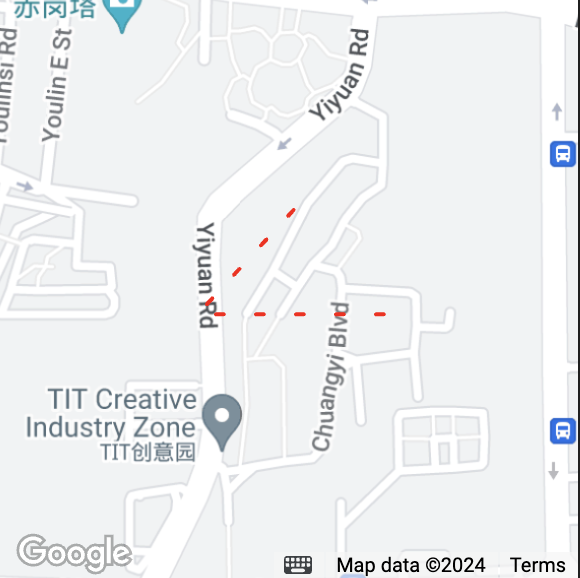
- Function DescriptionSpecify a series of coordinate points, connect the first item in the array to the last item. When drawing a rainbow line, you need to specify the colors of different segments. For example, if points contains 5 points, then colorList should pass in 4 color values; if the length of colorList is less than points.length - 1, the colors of the remaining segments will be consistent with the last item.
Properties
Type
Default value
Required
Remarks
iOS support
Android support
IDE support
points
Array of longitude and latitude
Array
Yes
[{latitude: 0, longitude: 0}]
Yes
Yes
Yes
color
Line color
string
No
Hexadecimal
Yes
Yes
Yes
colorList
Rainbow line
Array
No
Ignore color value if it exists
No
Google map: No
Huawei map: No
Tencent map: Yes
Baidu map: Yes
Amap: Yes
No
width
Line width
number
No
Yes
Yes
Yes
dottedLine
Is it a dotted line?
boolean
No
Default is false
Yes
Yes
Yes
arrowLine
Is it a dotted line?
boolean
No
-
No
Yes
No
arrowIconPath
Change arrow icon
string
No
-
No
Yes
No
borderColor
Line border color
string
No
-
No
Google map: No
Huawei map: No
Tencent map: Yes
Baidu map: No
Amap: No
Yes
borderWidth
Line thickness
number
No
-
No
Google map: No
Huawei map: No
Tencent map: Yes
Baidu map: No
Amap: No
Yes
level
Overlap relationship
string
No
Default is abovelabels
No
Google map: No
Huawei map: No
Tencent map: Yes
Baidu map: No
Amap: No
No
textStyle
Text style
TextStyle
No
Text style on polyline
No
Google map: No
Huawei map: No
Tencent map: Yes
Baidu map: No
Amap: No
No
segmentTexts
Segment text
Array.SegmentText
No
Text content and position on polyline
No
Google map: No
Huawei map: No
Tencent map: Yes
Baidu map: No
Amap: No
No
SegmentText
| Properties | Description | Type |
|---|---|---|
| name | Name | string |
| startIndex | Starting point | number |
| endIndex | End point | number |
TextStyle
| Properties | Description | Type | Default value |
|---|---|---|---|
| textColor | Text color | string | #000000 |
| strokeColor | Stroke color | number | #ffffff |
| fontSize | Text size | number | 14 |
| Value | Description |
|---|---|
| abovelabels | Display above all POIs |
| abovebuildings | Display above the building block and below the POI |
| aboveroads | Display above the road and below the building block |
polygon
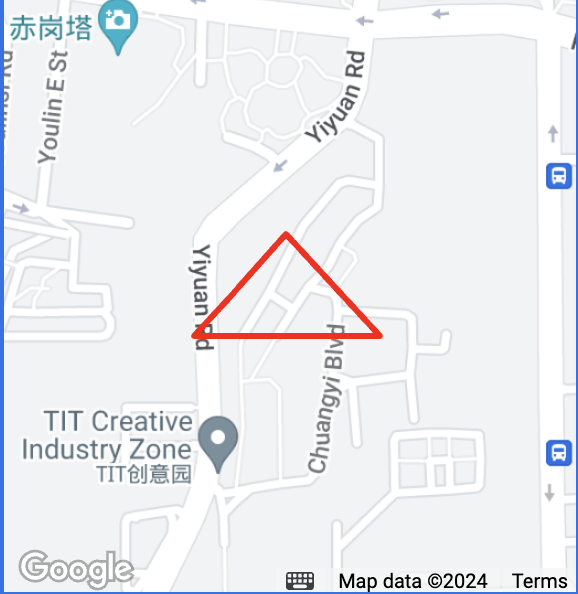
- DescriptionSpecify a series of coordinate points and generate a closed polygon based on the points coordinate data
Properties
Description
Default value
Required
Remarks
iOS support
Android support
IDE support
dashArray
Dash line
Array.number
No
The default value [0, 0] is a solid line, and [10, 10] is a dashed line consisting of 10 pixels of solid line and 10 pixels of blank space (and so on)
No
Google map: No
Huawei map: No
Tencent map: Yes
Baidu map: No
Amap: No
No
points
Array of longitude and latitude
array
Yes
[{latitude: 0, longitude: 0}]
Yes
Yes
Yes
strokeWidth
Stroke width
number
No
-
Yes
Yes
No
strokeColor
Stroke color
string
No
Hexadecimal
Yes
Yes
No
fillColor
Fill color
string
No
Hexadecimal
Yes
Yes
Yes
zIndex
Set the Z axis value of the polygon
number
No
-
No
Yes
Yes
level
Overlap relationship
string
Yes
Default is abovelabels
No
Google map: No
Huawei map: No
Tencent map: Yes
Baidu map: No
Amap: No
No
circle
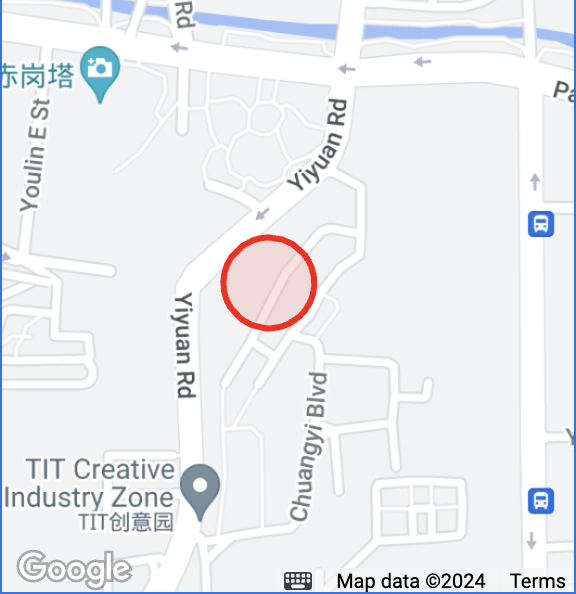
- Function Description: Display a circle on the map
Properties
Description
Default value
Required
Remarks
iOS support
Android support
IDE support
latitude
Latitude
number
Yes
The default value [0, 0] is a solid line, and [10, 10] is a dashed line consisting of 10 pixels of solid line and 10 pixels of blank space (and so on)
Yes
Yes
Yes
longitude
Longitude
number
Yes
Floating point number, range -180 ~ 180
Yes
Yes
Yes
color
Stroke color
string
No
Floating point number, range -180 ~ 180
Yes
Yes
Yes
fillColor
Fill color
string
No
Hexadecimal
Yes
Yes
Yes
radius
Radius
number
No
-
Yes
Yes
Yes
strokeWidth
Stroke width
number
No
-
Yes
Yes
No
level
Overlap relationship
string
Yes
Default is abovelabels
No
Google map: No
Huawei map: No
Tencent map: Yes
Baidu map: No
Amap: No
No
control
- Display the control on the map. The control does not move with the map and will be abandoned soon. It is recommended to use cover-view
Properties
Type
Default value
Required
Remarks
iOS support
Android support
IDE support
id
Control id
number
No
This id will be returned when the control is clicked
No
No
No
position
The location of the control on the map
object
Yes
The location of the control on the map
No
No
No
iconPath
Displayed icon
string
Yes
Image path in the project directory, supports local path and code package path
No
No
No
clickable
Is it clickable
boolean
No
Not clickable by default
No
No
No
position
Properties
Type
Default value
Required
Remarks
iOS support
Android support
IDE support
left
How far from the left border of the map
number
No
Default is 0
No
No
No
top
How far from the upper border of the map
number
No
Default is 0
No
No
No
width
Width of space
number
No
Default is image width
No
No
No
height
Height of space
number
No
Default is image height
No
No
No
bindregionchange return value
Properties
Description
Type
Remarks
type
Triggered when the field of view changes at the beginning and end
string
Field of view changes start with begin and end with end
causedBy
Causes of field of view changes
string
Drag the map (drag), zoom (scale), call the interface (update)
Scale
scale
3
4
5
6
7
8
9
10
11
Scale
1000km
500km
200km
100km
50km
25km
20km
10km
5km
scale
12
13
14
15
16
17
18
19
20
Scale
2km
1km
500m
200m
100m
50m
20m
10m
5m